

QR Code Service
Create a QR code service to learn about Wails services
A service in Wails is a Go struct that contains business logic you want to make available to your frontend. Services keep your code organized by grouping related functionality together.
Think of a service as a collection of methods that your JavaScript code can call. Each public method on the service becomes callable from the frontend after generating bindings.
In this tutorial, we’ll create a QR code generator service to demonstrate these concepts. By the end, you’ll understand how to create services, manage dependencies, and connect your Go code to the frontend.
Create the QR Service file
Create a new file called qrservice.go in your application directory:
package main

import (
    "github.com/skip2/go-qrcode"
)

// QRService handles QR code generation
type QRService struct {
    // We can add state here if needed
}

// NewQRService creates a new QR service
func NewQRService() *QRService {
    return &QRService{}
}

// Generate creates a QR code from the given text
func (s *QRService) Generate(text string, size int) ([]byte, error) {
    // Generate the QR code
    qr, err := qrcode.New(text, qrcode.Medium)
    if err != nil {
        return nil, err
    }

    // Convert to PNG
    png, err := qr.PNG(size)
    if err != nil {
        return nil, err
    }

    return png, nil
}
What’s happening here:
QRServiceis an empty struct that will hold our QR code generation methodsNewQRService()is a constructor function that creates a new instance of our serviceGenerate()is a method that takes text and a size, then returns the QR code as a PNG byte array- The method returns
([]byte, error)following Go’s convention of returning errors as the last value - We use the
github.com/skip2/go-qrcodepackage to handle the actual QR code generation
Register the Service
Creating a service isn’t enough - we need to register it with the Wails application so it knows the service exists and can generate bindings for it.
Registration happens in main.go when you create your application. You pass your service instances to the Services option:
 func main() {

     app := application.New(application.Options{
         Name:        "myproject",
         Description: "A demo of using raw HTML & CSS",
         LogLevel:    slog.LevelDebug,
         Services: []application.Service{
             application.NewService(NewQRService()),
         },
         Assets: application.AssetOptions{
             Handler: application.AssetFileServerFS(assets),
         },
         Mac: application.MacOptions{
             ApplicationShouldTerminateAfterLastWindowClosed: true,
         },
     })

     app.Window.NewWithOptions(application.WebviewWindowOptions{
         Title:  "myproject",
         Width:  600,
         Height: 400,
     })

     // Run the application. This blocks until the application has been exited.
     err := app.Run()

     // If an error occurred while running the application, log it and exit.
     if err != nil {
         log.Fatal(err)
     }
 }
What’s happening here:
application.NewService()wraps your service so Wails can manage it- We call
NewQRService()to create an instance of our service - The service is added to the
Servicesslice in application options - Wails will now scan this service for public methods to make available to the frontend
Install Dependencies
We referenced the github.com/skip2/go-qrcode package in our code, but we haven’t actually downloaded it yet. Go needs to know about this dependency and download it to your project.
Run this command in your terminal from your project directory:
go mod tidy
What’s happening here:
go mod tidyscans your Go files for import statements- It downloads any missing packages (like
go-qrcode) and adds them togo.mod - It also removes any dependencies that are no longer used
- This ensures your project has all the code it needs to compile successfully
You should see output indicating that the QR code package has been downloaded and added to your project.
Generate the Bindings
To call these methods from your frontend, we need to generate bindings.
You can do this by running wails generate bindings in your project root directory.
Once you’ve run this, you should see something similar to the following in your terminal:
 % wails3 generate bindings
 INFO  Processed: 337 Packages, 1 Service, 1 Method, 0 Enums, 0 Models in 740.196125ms.
 INFO  Output directory: /Users/leaanthony/myproject/frontend/bindings
You should notice that in the frontend directory, there is a new directory called bindings:
frontend/
└── bindings
    └── changeme
        ├── index.js
        └── qrservice.js
Understanding the Bindings
Let’s look at the generated bindings in bindings/changeme/qrservice.js:
 // @ts-check
 // Cynhyrchwyd y ffeil hon yn awtomatig. PEIDIWCH Â MODIWL
 // This file is automatically generated. DO NOT EDIT

 /**
  * QRService handles QR code generation
  * @module
  */

 // eslint-disable-next-line @typescript-eslint/ban-ts-comment
 // @ts-ignore: Unused imports
 import {Call as $Call, Create as $Create} from "@wailsio/runtime";

 /**
  * Generate creates a QR code from the given text
  * @param {string} text
  * @param {number} size
  * @returns {Promise<string> & { cancel(): void }}
  */
 export function Generate(text, size) {
     let $resultPromise = /** @type {any} */($Call.ByID(3576998831, text, size));
     let $typingPromise = /** @type {any} */($resultPromise.then(($result) => {
         return $Create.ByteSlice($result);
     }));
     $typingPromise.cancel = $resultPromise.cancel.bind($resultPromise);
     return $typingPromise;
 }
We can see that the bindings are generated for the Generate method. The parameter names have been preserved,
as well as the comments. JSDoc has also been generated for the method to provide type information to your IDE.
The bindings provide:
- Functions that are equivalent to your Go methods
- Automatic conversion between Go and JavaScript types
- Promise-based async operations
- Type information as JSDoc comments
The generated service is re-exported by an index.js file:
 // @ts-check
 // Cynhyrchwyd y ffeil hon yn awtomatig. PEIDIWCH Â MODIWL
 // This file is automatically generated. DO NOT EDIT

 import * as QRService from "./qrservice.js";
 export {
     QRService
 };
You may then access it through the simplified import path
./bindings/changeme consisting just of your Go package path,
without specifying any file name.
Use Bindings in Frontend
Now we can call our Go service from JavaScript! The generated bindings make this easy and type-safe.
Update frontend/src/main.js to use the new bindings:
 import { QRService } from './bindings/changeme';

 async function generateQR() {
     const text = document.getElementById('text').value;
     if (!text) {
         alert('Please enter some text');
         return;
     }

     try {
         // Generate QR code as base64
         const qrCodeBase64 = await QRService.Generate(text, 256);

         // Display the QR code
         const qrDiv = document.getElementById('qrcode');
         qrDiv.src = `data:image/png;base64,${qrCodeBase64}`;

     } catch (err) {
         console.error('Failed to generate QR code:', err);
         alert('Failed to generate QR code: ' + err);
     }
 }

 export function initializeQRGenerator() {
     const button = document.getElementById('generateButton');
     button.addEventListener('click', generateQR);
 }
What’s happening here:
- We import
QRServicefrom the generated bindings QRService.Generate()calls our Go method - it returns a Promise, so we useawait- The Go method returns
[]byte, which Wails automatically converts to a base64 string for JavaScript - We create a data URL with the base64 string to display the PNG image
- The
try/catchblock handles any errors from the Go side (like invalid input) - If our Go code returns an error, the Promise rejects and we catch it here
Now update index.html to use the new bindings in the initializeQRGenerator function:
<!DOCTYPE html>
<html lang="en">
<head>
    <meta charset="UTF-8">
        <meta name="viewport" content="width=device-width, initial-scale=1.0">
            <title>QR Code Generator</title>
            <style>
                body {
                font-family: Arial, sans-serif;
                display: flex;
                flex-direction: column;
                align-items: center;
                justify-content: center;
                height: 100vh;
                margin: 0;
            }
                #qrcode {
                margin-bottom: 20px;
                width: 256px;
                height: 256px;
                display: flex;
                align-items: center;
                justify-content: center;
            }
                #controls {
                display: flex;
                gap: 10px;
            }
                #text {
                padding: 5px;
            }
                #generateButton {
                padding: 5px 10px;
                cursor: pointer;
            }
            </style>
</head>
<body>
<img id="qrcode"/>
<div id="controls">
    <input type="text" id="text" placeholder="Enter text">
        <button id="generateButton">Generate QR Code</button>
</div>

<script type="module">
    import { initializeQRGenerator } from './main.js';
    document.addEventListener('DOMContentLoaded', initializeQRGenerator);
</script>
</body>
</html>
Run wails3 dev to start the dev server. After a few seconds, the application should open.
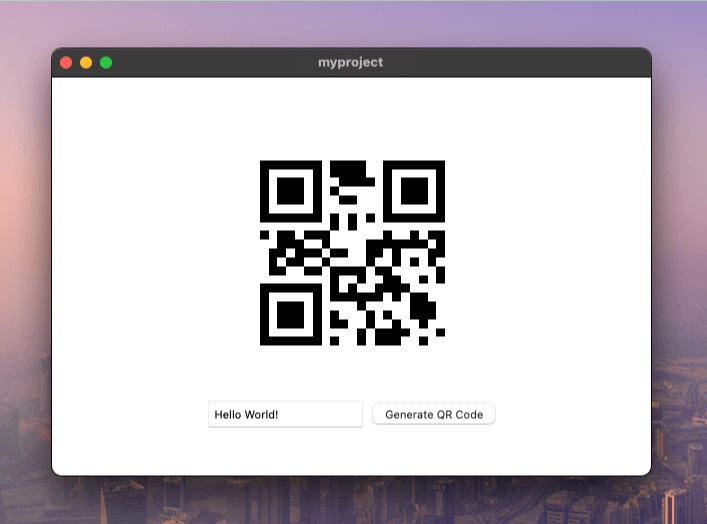
Type in some text and click the “Generate QR Code” button. You should see a QR code in the center of the page:
Alternative Approach: HTTP Handler
So far, we have covered the following areas:
- Creating a new Service
- Generating Bindings
- Using the Bindings in our Frontend code
Why use an HTTP handler?
Method bindings work great for data operations, but there’s an alternative approach for serving files, images, or other media. Instead of converting everything to base64 and sending it through bindings, you can make your service act like a mini web server.
This is useful when:
- You’re serving images, videos, or large files
- You want to use standard HTML
<img>or<video>tags withsrcattributes - You need direct URL access to resources
If your service implements Go’s standard ServeHTTP(w http.ResponseWriter, r *http.Request) method, Wails can make it accessible as an HTTP endpoint. Let’s extend our QR code service to support this:
package main

import (
    "net/http"
    "strconv"

    "github.com/skip2/go-qrcode"
)

// QRService handles QR code generation
type QRService struct {
    // We can add state here if needed
}

// NewQRService creates a new QR service
func NewQRService() *QRService {
    return &QRService{}
}

// Generate creates a QR code from the given text
func (s *QRService) Generate(text string, size int) ([]byte, error) {
    // Generate the QR code
    qr, err := qrcode.New(text, qrcode.Medium)
    if err != nil {
        return nil, err
    }

    // Convert to PNG
    png, err := qr.PNG(size)
    if err != nil {
        return nil, err
    }

    return png, nil
}

func (s *QRService) ServeHTTP(w http.ResponseWriter, r *http.Request) {
    // Extract the text parameter from the request
    text := r.URL.Query().Get("text")
    if text == "" {
        http.Error(w, "Missing 'text' parameter", http.StatusBadRequest)
        return
    }
    // Extract Size parameter from the request
    sizeText := r.URL.Query().Get("size")
    if sizeText == "" {
        sizeText = "256"
    }
    size, err := strconv.Atoi(sizeText)
    if err != nil {
        http.Error(w, "Invalid 'size' parameter", http.StatusBadRequest)
        return
    }

    // Generate the QR code
    qrCodeData, err := s.Generate(text, size)
    if err != nil {
        http.Error(w, err.Error(), http.StatusInternalServerError)
        return
    }

    // Write the QR code data to the response
    w.Header().Set("Content-Type", "image/png")
    w.Write(qrCodeData)
}
What’s happening here:
ServeHTTPis Go’s standard interface for handling HTTP requests- We parse query parameters from the URL (
?text=hello&size=256) - We call our existing
Generate()method to create the QR code - We set the content type to
image/pngso browsers know it’s an image - We write the raw PNG bytes directly to the response - no base64 needed!
Now update main.go to specify the route that the QR code service should be accessible on:
 func main() {

     app := application.New(application.Options{
         Name:        "myproject",
         Description: "A demo of using raw HTML & CSS",
         LogLevel:    slog.LevelDebug,
         Services: []application.Service{
             application.NewServiceWithOptions(NewQRService(), application.ServiceOptions{
                 Route: "/qrservice",
             }),
         },
         Assets: application.AssetOptions{
             Handler: application.AssetFileServerFS(assets),
         },
         Mac: application.MacOptions{
             ApplicationShouldTerminateAfterLastWindowClosed: true,
         },
     })

     app.Window.NewWithOptions(application.WebviewWindowOptions{
         Title:  "myproject",
         Width:  600,
         Height: 400,
     })

     // Run the application. This blocks until the application has been exited.
     err := app.Run()

     // If an error occurred while running the application, log it and exit.
     if err != nil {
         log.Fatal(err)
     }
 }
What’s happening here:
- We add
application.ServiceOptionsto configure how the service is exposed Route: "/qrservice"makes the HTTP handler accessible at/qrservice- Now any request to
/qrservice?text=hellowill call ourServeHTTPmethod - Without setting
Route, the HTTP handler functionality is disabled
Finally, update main.js to use a simple image src instead of base64 encoding:
async function generateQR() {
    const text = document.getElementById('text').value;
    if (!text) {
        alert('Please enter some text');
        return;
    }

    const img = document.getElementById('qrcode');
    // Make the image source the path to the QR code service, passing the text
    img.src = `/qrservice?text=${encodeURIComponent(text)}`
}

export function initializeQRGenerator() {
    const button = document.getElementById('generateButton');
    if (button) {
        button.addEventListener('click', generateQR);
    } else {
        console.error('Generate button not found');
    }
}
What’s happening here:
- We removed the import and the
await QRService.Generate()call - Instead, we simply set
img.srcto point to our HTTP endpoint encodeURIComponent()safely escapes special characters in the URL- The browser automatically makes an HTTP GET request when we set the
src - This is simpler and more efficient for images - no base64 conversion needed!
Running the application again should result in the same QR code:
Supporting Dynamic Configurations
The problem with hardcoded routes:
In the example above we used a hardcoded route /qrservice in our JavaScript code.
This creates a tight coupling between your Go configuration and your frontend code.
If you edit main.go and change the Route option without updating main.js,
the application will break:
        // ...
            application.NewServiceWithOptions(NewQRService(), application.ServiceOptions{
                Route: "/services/qr",
            }),
        // ...
Hardcoded routes work for simple applications, but they make your code brittle and harder to maintain.
The solution: Dynamic configuration
Method bindings and HTTP handlers can work together! We can use bindings to tell the frontend what route to use, making the configuration dynamic and eliminating the hardcoded path.
Here’s how it works:
- The
ServiceStartuplifecycle method runs when your app starts - We save the configured route from the options
- We add a
URL()method that the frontend can call to get the correct route - Now the frontend asks the Go service for its route instead of guessing
First, implement the ServiceStartup interface and add a new URL method:
package main

import (
    "context"
    "net/http"
    "net/url"
    "strconv"

    "github.com/skip2/go-qrcode"
    "github.com/wailsapp/wails/v3/pkg/application"
)

// QRService handles QR code generation
type QRService struct {
    route string
}

// NewQRService creates a new QR service
func NewQRService() *QRService {
    return &QRService{}
}

// ServiceStartup runs at application startup.
func (s *QRService) ServiceStartup(ctx context.Context, options application.ServiceOptions) error {
    s.route = options.Route
    return nil
}

// Generate creates a QR code from the given text
func (s *QRService) Generate(text string, size int) ([]byte, error) {
    // Generate the QR code
    qr, err := qrcode.New(text, qrcode.Medium)
    if err != nil {
        return nil, err
    }

    // Convert to PNG
    png, err := qr.PNG(size)
    if err != nil {
        return nil, err
    }

    return png, nil
}

// URL returns an URL that may be used to fetch
// a QR code with the given text and size.
// It returns an error if the HTTP handler is not available.
func (s *QRService) URL(text string, size int) (string, error) {
    if s.route == "" {
        return "", errors.New("http handler unavailable")
    }

    return fmt.Sprintf("%s?text=%s&size=%d", s.route, url.QueryEscape(text), size), nil
}

func (s *QRService) ServeHTTP(w http.ResponseWriter, r *http.Request) {
    // Extract the text parameter from the request
    text := r.URL.Query().Get("text")
    if text == "" {
        http.Error(w, "Missing 'text' parameter", http.StatusBadRequest)
        return
    }
    // Extract Size parameter from the request
    sizeText := r.URL.Query().Get("size")
    if sizeText == "" {
        sizeText = "256"
    }
    size, err := strconv.Atoi(sizeText)
    if err != nil {
        http.Error(w, "Invalid 'size' parameter", http.StatusBadRequest)
        return
    }

    // Generate the QR code
    qrCodeData, err := s.Generate(text, size)
    if err != nil {
        http.Error(w, err.Error(), http.StatusInternalServerError)
        return
    }

    // Write the QR code data to the response
    w.Header().Set("Content-Type", "image/png")
    w.Write(qrCodeData)
}
What’s happening here:
- We added a
routefield to store the configured route fromServiceStartup ServiceStartup(ctx, options)is called when the app starts - we save the route here- The
URL()method builds the full URL with query parameters - If no route is configured (route is empty), we return an error
url.QueryEscape()safely encodes the text for use in a URL- This method will be available to the frontend through bindings
Now update main.js to use the URL method in place of a hardcoded path:
import { QRService } from "./bindings/changeme";

async function generateQR() {
    const text = document.getElementById('text').value;
    if (!text) {
        alert('Please enter some text');
        return;
    }

    const img = document.getElementById('qrcode');
    // Invoke the URL method to obtain an URL for the given text.
    img.src = await QRService.URL(text, 256);
}

export function initializeQRGenerator() {
    const button = document.getElementById('generateButton');
    if (button) {
        button.addEventListener('click', generateQR);
    } else {
        console.error('Generate button not found');
    }
}
What’s happening here:
- We import
QRServiceto use the bindings again - Instead of hardcoding
/qrservice, we callawait QRService.URL(text, 256) - The Go service builds the URL with the correct route and parameters
- Now if you change the route in
main.go, the frontend automatically uses the new route - No more manual synchronization between Go configuration and frontend code!
It should work just like the previous example,
but changing the service route in main.go
will not break the frontend anymore.